A cheat sheet for common numpy and Python APIs you would see and require for deep learning based programming for robotics
np.zeros
numpy.zeros(shape, dtype=float, order=‘C’, *, like=None)
Return a new array of given shape and type, filled with zeros.
- Parameters:
-
- shapeint or tuple of ints
-
Shape of the new array, e.g.,
(2, 3)or2. - dtypedata-type, optional
-
The desired data-type for the array, e.g.,
numpy.int8. Default isnumpy.float64. - order{‘C’, ‘F’}, optional, default: ‘C’
-
Whether to store multi-dimensional data in row-major (C-style) or column-major (Fortran-style) order in memory.
- likearray_like, optional
-
Reference object to allow the creation of arrays which are not NumPy arrays. If an array-like passed in as
likesupports the__array_function__protocol, the result will be defined by it. In this case, it ensures the creation of an array object compatible with that passed in via this argument.
np.zeros(5)
array([ 0.,  0.,  0.,  0.,  0.])  # default is numpy.float64
>>>np.zeros((5,), dtype=int) #if you want to create a 1D array
array([0, 0, 0, 0, 0])
>>>np.zeros((5,1))
array([[0.],
[0.],
[0.],
[0.],
[0.]])
>>>s = (2,2)
>>>np.zeros(s)
array([[ 0., 0.],
[ 0., 0.]]
#Multi-dim array
>> np.zeros((4,3,2)) #a row of 2 element repeated 3 times-> 3*2 array->repeated 4 times to give 4*3*2 array
array([[[0., 0.],
[0., 0.],
[0., 0.]],
[[0., 0.],
[0., 0.],
[0., 0.]],
[[0., 0.],
[0., 0.],
[0., 0.]],
[[0., 0.],
[0., 0.],
[0., 0.]]])Get and Set Numpy Array Value
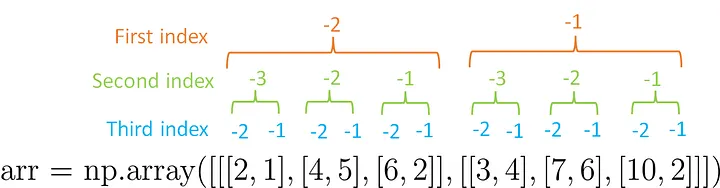
x = np.zeros((4,3,2))
#just like you would do in Python list or C array
x[3][1][0]=1
Negative Indexing
np.zeros_like
- numpy.zeros_like(a, dtype=None, order=‘K’, subok=True, shape=None)[source]
-
Return an array of zeros with the same shape and type as a given array.
- Parameters:
-
- aarray_like
-
The shape and data-type of a define these same attributes of the returned array.
- dtypedata-type, optional
-
Overrides the data type of the result.
>>>x = np.arange(6)}
>>>x = x.reshape((2, 3))
>>>x
array([[0, 1, 2],
       [3, 4, 5]])
>>>np.zeros_like(x)
array([[0, 0, 0],
       [0, 0, 0]])
np.ones:
everything similar to np.zeros
np.ones((2, 1))
array([[1.],
       [1.]])
np.eye:
- numpy.eye(N, M=None, k=0, dtype=<class ‘float’>, order=‘C’, *, like=None)
-
Return a 2-D array with ones on the diagonal and zeros elsewhere.
- Parameters:
-
- Nint
-
Number of rows in the output.
- Mint, optional
-
Number of columns in the output. If None, defaults to N.
- kint, optional
-
Index of the diagonal: 0 (the default) refers to the main diagonal, a positive value refers to an upper diagonal, and a negative value to a lower diagonal.
- dtypedata-type, optional
-
Data-type of the returned array.
>>>np.eye(2, dtype=int)
array([[1, 0],
       [0, 1]])
>>> np.eye(3, k=1)
array([[0.,  1.,  0.],
       [0.,  0.,  1.],
       [0.,  0.,  0.]])
reversed(range(n))
iterate in reverse ie. n-1,n-2,…0
np.random.shuffle
- random.shuffle(x)
-
Modify a sequence in-place by shuffling its contents.
This function only shuffles the array along the first axis of a multi-dimensional array. The order of sub-arrays is changed but their contents remains the same.
arr = np.arange(10)
>>> np.random.shuffle(arr)
>>> arr
[1 7 5 2 9 4 3 6 0 8] # random

# works for multi-D array also

arr = np.arange(9).reshape((3, 3))
np.random.shuffle(arr)
arr
array([[3, 4, 5], # random
       [6, 7, 8],
       [0, 1, 2]])
np.arange
>>>np.arange(6) # 1D array
array([0, 1, 2, 3, 4, 5])
np.reshape
- numpy.reshape(a, newshape, order=‘C’)
-
Gives a new shape to an array without changing its data.
- Parameters:
-
- aarray_like
-
Array to be reshaped.
- newshapeint or tuple of ints
-
The new shape should be compatible with the original shape. If an integer, then the result will be a 1-D array of that length. One shape dimension can be -1. In this case, the value is inferred from the length of the array and remaining dimensions.
>>>a = np.arange(6).reshape((3, 2))}
>>>a
#notice it is row wise. It makes easier to visualize if you put all the element
#in 1D row array. Then take start row wise rearrangement

array([[0, 1],
       [2, 3],
       [4, 5]])

>>>np.reshape(a, (2, 3)) # C-like index ordering
array([[0, 1, 2],
       [3, 4, 5]])

#there can be one -1 index meaning its dimention are infered from number of elements and remaining specified shape
>>>np.reshape(a, (3,-1))       # the unspecified value is inferred to be 2
array([[1, 2],
       [3, 4],
       [5, 6]])
np array slices
The syntax of Python NumPy slicing is [start : stop : step]
Start: This index by default considers as ‘0’stop: This index considers as a length of the array.step: By default it is considered as ‘1’.
#this is another way to create a numpy array
>>>arr = np.array([3, 5, 7, 9, 11, 15, 18, 22])
>>> arr2 = arr[:5]
# [ 3  5  7  9 11]
>>>arr2 = arr[-4:-2]
# [11 15]
>>>arr2 = arr[::3]
#[ 3  9 18]


arr = np.array([[3, 5, 7, 9, 11],
               [2, 4, 6, 8, 10]])


# Use slicing a 2-D arrays
arr2 = arr[1:,1:3]  #2D array remains 2D array
[[4 6]]

arr2 = arr[1,1:3] #2D array remains 1D array

#now try solving this before looking at the solution
arr = np.array([[[3, 5, 7, 9, 11],
                 [2, 4, 6, 8, 10]],
                [[5, 7, 8, 9, 2],
                 [7, 2, 3, 6, 7]]])

arr2 = arr[0,1,0:2]
[2 4]Numpy Axes
for a 2D array remember this figure

>>> np_array_2d = np.arange(0, 6).reshape([2,3])
[[0 1 2]
 [3 4 5]]

>>>np.sum(np_array_2d, axis = 0)
array([3, 5, 7])

>>>np.sum(np_array_2d, axis = 1) #2d array become 1D in either case

array([3, 12])   # note its not array([[3],[12]])

>>> np_array_1s = np.array([[1,1,1],[1,1,1]])
array([[1, 1, 1],
       [1, 1, 1]])
>>> np_array_9s = np.array([[9,9,9],[9,9,9]])
array([[9, 9, 9],
       [9, 9, 9]])

>>> np.concatenate([np_array_1s, np_array_9s], axis = 0)
array([[1, 1, 1],
       [1, 1, 1],
       [9, 9, 9],
       [9, 9, 9]])

>>> np.concatenate([np_array_1s, np_array_9s], axis = 1)
array([[1, 1, 1, 9, 9, 9],
       [1, 1, 1, 9, 9, 9]])

# Be careful with 1D arrays are different. there is only 1 axis ie axis 0

>>> np_array_1s_1dim = np.array([1,1,1])
>>> np_array_9s_1dim = np.array([9,9,9])

>>> np.concatenate([np_array_1s_1dim, np_array_9s_1dim], axis = 0)

array([1, 1, 1, 9, 9, 9])